Using a public EV charging station becomes much easier once you know what to check before plugging in. The essentials are straightforward: make sure the charger is compatible with your vehicle, understand whether you are using AC or DC charging, check the price, and find out how that particular station starts and authorizes a session.
There is no single procedure that works at every public charger. Some stations start through an app or RFID card, others accept direct bank-card payment, and compatible vehicles and charging networks may support automatic authentication. Even the order of plugging in and authorizing the session can differ.
This guide explains the process from choosing a station to disconnecting, along with the payment methods, connector differences and common problems that can affect a public charging session.
Before You Charge: Understand AC and DC Charging
Public EV charging falls into two broad categories: AC charging and DC charging.
With AC charging, the station supplies alternating current and the vehicle’s onboard charger converts it to DC before the energy reaches the battery. If you want to understand what happens electrically between the charger and battery, see our guide to AC-to-DC conversion in EV charging. This type of charging is commonly found at workplaces, hotels, shopping centers, parking facilities and destinations where vehicles may remain parked for an extended period.
With DC fast charging, conversion takes place in the charging equipment and DC power is supplied to the vehicle’s high-voltage battery system. It is intended for vehicles designed to accept DC charging and is particularly useful for shorter charging stops and long-distance travel.
The power rating printed on a charger is not a promise that your vehicle will receive that charging rate. Actual power can be limited by the vehicle, battery state of charge, battery temperature, charger configuration and site conditions such as power sharing between charging points.
How to Use a Public EV Charging Station Step by Step
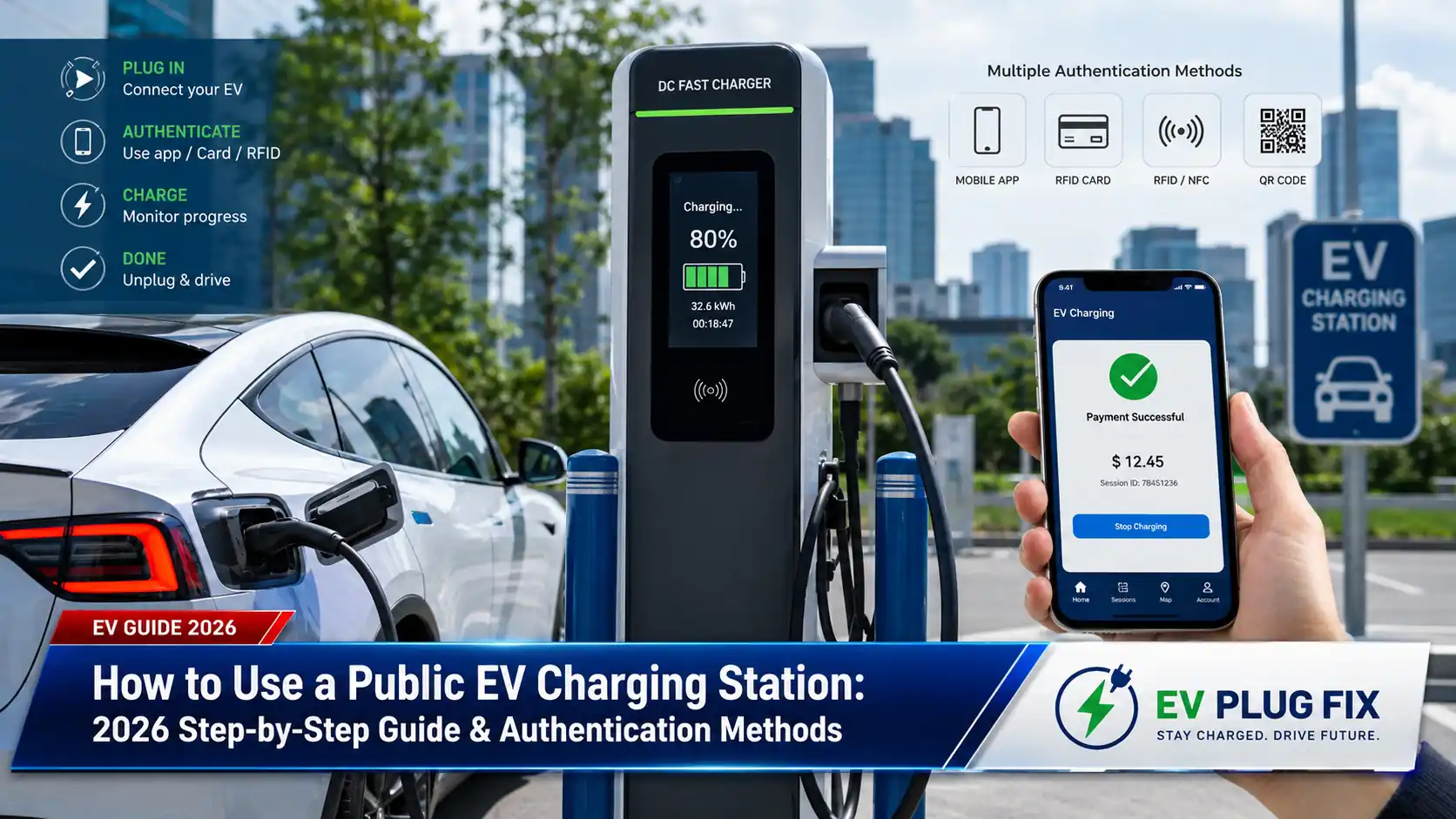
- Find a compatible charger. Check the connector, AC or DC charging type, station status and any vehicle or network restrictions before driving to the site.
- Park within easy reach of the cable. Account for the location of your vehicle’s charge port. Do not stretch, sharply bend or drive over a charging cable.
- Read the price and parking rules. Check the tariff shown by the operator and look for session, time, idle or parking charges that may apply. Comparing home and public charging costs can also help put the station’s rate in context.
- Follow the station’s connection sequence. Some chargers instruct you to connect the vehicle first, while others may ask you to select or authorize a charging point before plugging in.
- Authorize the session. Use one of the methods supported by the station, such as an app, RFID card, direct payment, web payment or compatible automatic authentication.
- Make sure charging has started. Look for confirmation on the charger, vehicle or charging app. Simply connecting the cable does not guarantee that energy is flowing.
- Monitor the session when necessary. Check state of charge, charging power, elapsed time and cost, particularly when the site applies time or idle fees.
- End the session using the correct method. Follow the instructions provided by the vehicle or charging operator and wait for the connector to unlock before removing it.
- Return the cable and move the vehicle. Put a tethered cable back in its holder and vacate the charging space when the session is complete, subject to the site’s parking rules.
How Public EV Chargers Identify and Charge Drivers
Public charging networks use different methods to associate a charging session with a customer, contract or payment method. A station may support several options or only one. The instructions displayed by the charging operator should therefore take precedence over a generic charging procedure.
| Method | What You Need | Useful For | Main Limitation |
|---|---|---|---|
| Charging-network app | Phone, account and applicable payment setup | Drivers who regularly use the same network | Can depend on account access and phone connectivity |
| RFID card or fob | A card or token accepted by the charging service | Regular users, fleets and compatible roaming services | Acceptance is not universal |
| Direct bank-card payment | A supported payment card or digital wallet | Ad-hoc charging without joining a network | Availability depends on the charger and market |
| QR or web payment | A phone and internet connection | Occasional charging | Drivers need to verify that the payment page is genuine |
| Plug & Charge | Compatible vehicle, charging infrastructure and charging contract | Automatic authentication and authorization | Requires support across the relevant charging ecosystem |
| Autocharge | Compatible vehicle and enrollment with a participating provider | Automatic starts on supported networks | Implementation and compatibility are provider-specific |
Using a Charging-Network App
Apps remain a common way to access networked public chargers. Depending on the operator and market, an app may display charging locations, station status, tariffs and session information while also providing account management and charging controls.
At the station, identify the correct charger or connector before starting the session. Charging sites often use stall numbers, charger IDs or connector identifiers. Selecting the wrong one can result in a failed start or an attempt to authorize a different charging point.
Operators such as ChargePoint, EVgo and Electrify America provide driver information for their respective networks. Available features, payment methods and vehicle compatibility can vary by network, charger and market.
Third-party charging maps can also help locate stations across several networks. However, locating a charger and having authorization to start a session are different functions. A station appearing in a mapping service does not necessarily mean that the same service can initiate or pay for charging there.
Using QR Codes and Web Payment
Some charging stations provide a QR code that directs drivers to a web page for payment, authentication or additional station information. This can provide an ad-hoc option without requiring a permanent account.
QR codes should be treated carefully because a legitimate sticker can potentially be covered by a fraudulent one. Before entering payment information, check that the page belongs to the charging operator identified on the equipment. If the code or destination looks suspicious, use the operator’s official app or manually navigate to its official website instead.
A QR code does not necessarily lead directly to a payment page. Depending on the operator, it might open an app, identify the charger, provide instructions or direct the driver to customer support.
Using an RFID Charging Card or Key Fob
RFID cards and fobs are commonly used for account-based charging. After an accepted card has been associated with a valid charging account, the driver normally presents it to the station’s reader when instructed. Our guide to how RFID EV charging works explains the authentication process in more detail.
RFID can be convenient when opening an app is impractical or phone coverage is poor. It should not, however, be treated as a guarantee that a charger will function during every communications or backend outage. How authentication is handled during a disruption depends on the charging system’s configuration.
Roaming arrangements may allow a card or mobility-service account from one provider to access charging points operated by another. Coverage and tariffs can differ between providers and networks, so verify current acceptance and pricing before depending on a roaming card for a trip.
Paying With a Credit or Debit Card
Some public charging stations allow drivers to pay directly with a supported bank card or digital wallet without establishing a charging-network account. Where offered, direct payment can simplify occasional public charging.
Do not assume that ad-hoc payment is always more expensive than charging through an account. Operators may offer different tariffs, memberships or discounts, so compare the price presented at the charger with any account-based rate available to you.
Payment requirements also depend on jurisdiction. In the European Union, Regulation (EU) 2023/1804 on the deployment of alternative fuels infrastructure establishes requirements for ad-hoc payment at publicly accessible charging points. The applicable provisions differ according to factors including charging-point power and deployment date, so they should not be reduced to a claim that every existing charger must have the same type of card terminal. The current consolidated legislation is available through EUR-Lex.
How Plug & Charge Works
Plug & Charge is associated with the ISO 15118 family of communication standards. In a compatible implementation, the vehicle and charging infrastructure can use digital credentials to support automatic authentication and authorization, reducing or eliminating the need to manually initiate the session with an app or RFID card.
Support has to extend beyond the connector itself. The vehicle, charging equipment, backend services, charging contract and relevant certificate infrastructure must work together. A vehicle that supports relevant ISO 15118 functionality therefore cannot be assumed to offer Plug & Charge at every charging station.
Likewise, descriptions such as “ISO 15118 ready” or “hardware ready” do not necessarily mean that a functioning Plug & Charge service is active. Actual availability depends on the implementation and services surrounding the hardware.
EU rules should also not be summarized as requiring every public charger to offer Plug & Charge from 2027. Commission Delegated Regulation (EU) 2025/656 establishes technical interoperability requirements applying to specified publicly accessible charging points installed or renovated from January 1, 2027. It also sets requirements relevant where automatic authentication and authorization are offered. The regulation itself can be reviewed through EUR-Lex.
How Autocharge Is Different From Plug & Charge
Autocharge can provide a similar plug-in-and-start experience, but it is not another name for ISO 15118 Plug & Charge.
Implementations are provider-specific. EVgo, for example, offers Autocharge+ for eligible vehicles after enrollment. Drivers considering the feature should check EVgo’s current Autocharge+ information for vehicle and account requirements rather than assuming compatibility from the connector alone.
Autocharge implementations do not necessarily use the contract-certificate architecture associated with ISO 15118 Plug & Charge. This distinction matters because a vehicle enrolled for automatic charging with one provider should not be assumed to receive the same functionality on another network.
Check the Connector Before Worrying About Payment
Authentication cannot overcome an incompatible charging interface. Before choosing a public station, verify that your vehicle can use the connector and charging method offered there, either directly or through an adapter specifically supported for the vehicle and charging application. The differences between common interfaces are covered in our EV charging connector guide.
North America
North America is transitioning across a charging landscape that includes CCS1 and the coupler commonly known as NACS. SAE has standardized the NACS-style coupler within its J3400 framework for conductive charging. Current information about the standard is available from SAE International.
A matching connector shape does not by itself guarantee charging access. Vehicle compatibility, adapter support, charger hardware, software and charging-network authorization can all affect whether a particular vehicle can use a station.
Europe
Type 2 is the principal interoperable interface specified for normal- and high-power AC charging at relevant publicly accessible infrastructure in the European Union, while Combo 2, commonly known as CCS2, is specified for relevant DC charging infrastructure. Applicable technical requirements depend on the charging point and its installation or renovation date.
European AC stations may use a socket rather than a permanently attached charging cable. In that case, the driver needs an appropriate cable compatible with the vehicle and charging point.
CHAdeMO and Other Regional Interfaces
CHAdeMO remains relevant to existing vehicles and charging infrastructure in a number of markets, including Japan. Its availability at public stations varies considerably by country, network and location.
China also uses GB/T-based charging interfaces. Connector and communication differences between markets are one reason drivers should never assume that an adapter designed for one region automatically makes a vehicle compatible with charging infrastructure elsewhere.
Why Charger Power and Actual Charging Speed Are Different
The maximum output advertised for a charging station represents the capability of the equipment under suitable conditions. It is not a guaranteed charging rate for every connected vehicle.
The vehicle and charger establish operating limits during the session, while the vehicle’s battery-management and charging systems determine what the battery can accept. Battery state of charge and temperature can have a substantial effect on DC fast-charging power.
Charging power can also change during a session. Many EVs reduce DC charging power as battery conditions and state of charge change, but there is no universal percentage at which every EV suddenly slows down. Charging curves vary by vehicle and conditions.
Site design can matter as well. Some charging installations share available electrical capacity between charging points, which can affect the power available when several vehicles are connected.
How to Monitor a Public Charging Session
Before leaving the vehicle, confirm that charging is actually underway. Depending on the station and vehicle, confirmation may appear on the charger display, in the charging app, on the vehicle dashboard or through a combination of these interfaces.
Available information may include charging power, energy delivered, battery state of charge, elapsed time, estimated completion time and session cost. The information displayed varies between charging systems.
During a road trip, the fastest strategy is not necessarily to charge to the highest possible state of charge at every stop. If your vehicle’s charging power has fallen substantially, leaving earlier and using another suitable charger later may reduce overall journey time. That decision depends on the vehicle’s charging curve, available range, weather, route and the reliability and availability of chargers ahead.
How to End a Public Charging Session
Do not attempt to pull out a connector while it is locked. Follow the instructions provided by the charging station or vehicle. Depending on the system, charging may be stopped through an app, charger controls, RFID card or vehicle interface.
After the session has ended and the connector has unlocked, remove it carefully. Return a tethered cable to its holder. If you used your own AC charging cable, disconnect and store it according to the vehicle and station instructions.
Where available, check the final session summary or receipt. This can help confirm the amount of energy delivered and the final charge, particularly where the payment system initially placed a temporary authorization on a bank card.
Public Charging Etiquette
- Do not occupy a charging space without charging unless the site’s rules explicitly permit it.
- Move your vehicle after charging when required or practical, particularly at busy fast-charging sites.
- Do not unplug another driver’s vehicle unless the equipment, vehicle and site rules clearly allow it.
- Return tethered cables properly rather than leaving them where they can be driven over or create an obstruction.
- Park within the space assigned to your charging point and avoid blocking neighboring chargers.
- Check parking restrictions independently of charging fees. Paying for a charging session does not necessarily include or replace parking charges.
What to Do When a Public Charger Will Not Start
Start with the simple checks. Make sure the vehicle is ready to charge, the correct connector is being used and the plug is fully inserted. Read the charger display and vehicle messages for authentication, connection or charging errors.
If authorization fails, try another officially supported payment or authentication method when one is available. For example, a station might support both an app and direct payment, or an account may offer more than one method of identification.
If the charger recognizes the vehicle but the session immediately stops, end the attempt according to the instructions, disconnect safely and try a fresh session. If the site has another compatible charging point, changing stalls can help determine whether the failure is isolated to one unit.
Check the operator’s app or official station information for an outage or maintenance notice if the problem continues.
Never force a connector, use visibly damaged charging equipment or attempt to open or repair a public charger. Report damaged or malfunctioning equipment through the operator’s official support channel or the contact information displayed at the site.
FAQ
Do I need an app to use a public EV charger?
Not always. Depending on the station, you may be able to use direct card payment, web-based ad-hoc payment, an accepted RFID card or compatible automatic authentication. Other chargers may require or strongly depend on an operator account or app. Check the station’s current access methods before relying on it.
What is the difference between Plug & Charge and Autocharge?
Plug & Charge is associated with the ISO 15118 framework and can use digital certificates for automatic authentication and authorization. Autocharge is a provider-specific approach that can recognize an enrolled compatible vehicle through a different identification mechanism. Both may reduce manual steps, but they are not technically equivalent.
Can one RFID charging card work on every public network?
No. Roaming agreements can extend a card or account across multiple charging operators, but coverage is not universal. The tariff may also differ when charging is billed through a roaming service rather than directly through the charging-point operator.
Can I pay for EV charging with a normal credit or debit card?
Some stations support direct bank-card or contactless payment. Availability depends on the charger, operator and market, while regulations in jurisdictions such as the European Union impose ad-hoc payment requirements on certain publicly accessible charging infrastructure. Do not assume that every charger has the same payment hardware.
Why is my EV charging more slowly than the charger’s advertised power?
The charger’s advertised figure is a maximum equipment rating rather than a guaranteed rate. Your vehicle may accept less power because of its charging limits, battery state of charge, battery temperature or other battery-management constraints. Charger configuration and site-level power sharing can also affect available power.
Should I always stop DC fast charging at 80%?
No. There is no universal percentage that is correct for every EV or journey. Higher states of charge often involve lower charging power, so leaving earlier can save time when another reliable charger is comfortably within range. Charging further may be sensible when chargers ahead are sparse, weather or driving conditions increase consumption, or additional range provides a useful safety margin.
Bottom Line
The easiest way to use a public EV charging station is to check compatibility before thinking about payment. Confirm the charging type and connector, make sure the cable can reach your vehicle without strain, review the tariff and parking rules, and then follow the station’s own instructions for connecting and authorization.
Apps and RFID cards remain common, while direct card and web payment can make ad-hoc charging easier where supported. Plug & Charge and provider-specific Autocharge services can reduce manual authentication for compatible vehicles, but neither should be assumed to work across every charger or network.
Once you start the session, confirm that the vehicle is actually charging before walking away. When finished, stop the session properly, disconnect only after the connector unlocks and move the vehicle in accordance with the site’s parking and idle-fee rules.
Source Transparency
This guide separates general public-charging practice from technical, regulatory and network-specific requirements. Regulatory and standards-related details were checked against primary materials including European Union alternative-fuels infrastructure legislation, EU technical interoperability requirements and SAE documentation for J3400. Network-specific automatic charging information is attributed to the relevant operator.
Charging-network features, vehicle compatibility, tariffs, roaming arrangements and payment methods can change. Before relying on a particular charging point during a journey, verify current station information with the charging operator and, where vehicle compatibility is involved, the vehicle manufacturer.