EV Charger LED Error Codes Decoded: Troubleshooting in 2026
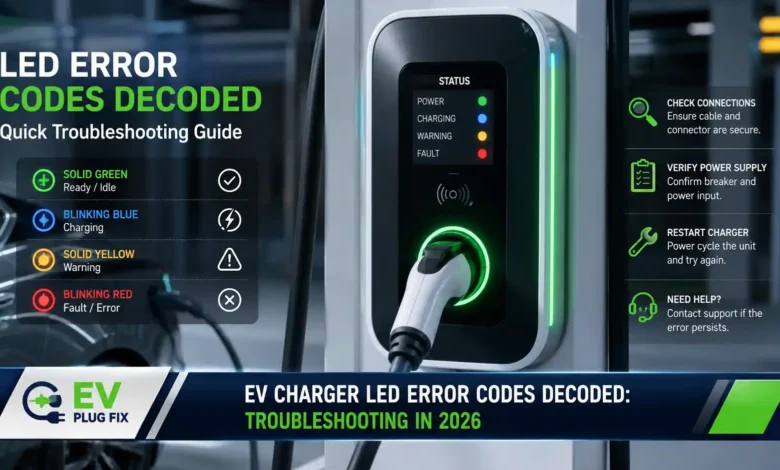
EV charger LED error codes are the first line of defense when your electric vehicle refuses to charge, and in 2026, understanding these visual signals is more critical than ever as the home charging industry moves toward standardized diagnostics. That blinking red light on your go-e, Tesla Wall Connector, or other EVSE (Electric Vehicle Supply Equipment) isn’t just a random warning—it’s a sophisticated communication system that pinpoints exactly why your EV isn’t getting the juice it needs. With over 80% of EV charging happening at home according to the U.S. Department of Energy, and more than 60% of home charger failures involving the electrical supply rather than the charger itself, knowing how to read these LED codes can save you time, money, and unnecessary frustration. Whether you’re dealing with a tripped breaker, a ground fault, or a more complex issue, the LED indicators provide immediate diagnostic clues that can help you decide whether you need a simple reset or a call to an electrician. For homeowners planning new installations, understanding these diagnostics is essential—check out our comprehensive Level 2 EV Charger Installation guide to ensure your setup is optimized from the start.
Expert Insight: Why LED Error Codes Matter
LED error codes represent a universal language for EV chargers that eliminates guesswork from troubleshooting. Manufacturers like go-e, Tesla, and Leviton all use specific blink patterns to communicate different fault types, helping you understand whether the problem is with the charger itself, your vehicle’s 12V battery, or your home’s electrical system. Understanding these codes becomes even more critical when dealing with specific vehicle-charger interactions—for instance, certain compatibility issues can trigger unexpected error patterns that our Cross-Brand EV Charging Compatibility resource can help you navigate.
Decoding the LED Status Indicators: What Each Light Pattern Means
Tesla Wall Connector LED Error Codes (2026)
Tesla’s Gen 3 Wall Connector uses a systematic blink code approach where red flashes pause for one second between cycles. The “No Lights” condition is particularly critical—if your Tesla charger shows no LEDs despite power being connected, you’re likely facing a power supply issue. Check your circuit breaker and consider having an electrician verify voltage presence at the terminal block using a multimeter.
- One Red Blink: Ground fault circuit interruption—inspect the handle, cable, and charge port for damage or water ingress
- Two Red Blinks: Ground assurance fault—verify proper grounding and check all physical connections
- Three Red Blinks: High temperature detected—update firmware and check for excessive warmth
- Six Red Blinks: Overvoltage or poor grid quality—verify power supply nominal voltage
- Seven Red Blinks: Vehicle overcurrent detected—reduce charge current setting
Go-e Charger LED Status Interpretation
The go-e charger’s LED system is particularly sophisticated, with color codes that correspond to factory settings and indicating everything from normal operation to critical failures. If the LEDs don’t light up despite a power connection, check the overload protection of the connection and the device fuse on the back of the go-eCharger. A defective fuse often means the power connection isn’t properly installed. For a complete understanding of go-e’s ecosystem, including advanced features that can help prevent errors, explore our detailed go-e Gemini flex Comparison and learn how different models handle diagnostic reporting.
Go-e LED Troubleshooting Checklist
- Check overload protection of the connection
- Verify the device fuse on charger back is intact
- Inspect charging cable and plug tightness
- Confirm proper earthing of the supply line
Industry Standard Codes: ChargeX Minimum Required Error Codes
The ChargeX Consortium, which ran from June 2023 to September 2025, proposed standardized error codes that are becoming the industry benchmark for EV charging diagnostics in 2026. These MRECs (Minimum Required Error Codes) address the challenges of custom manufacturer codes by providing a unified methodology. For instance, CX002 covers ground failure, CX003 addresses high temperature, and CX004 handles overcurrent failure. Implementing smart charging strategies can help prevent many of these fault conditions—our guide on EV Load Shifting Strategies explains how to optimize your charging schedule to avoid grid-related errors.
“The ChargeX consortium recommends that the industry implement MRECs uniformly to streamline error reporting and improve diagnostics.”
Most Common EV Charger Failures and Their LED Warnings
Electrical Supply Issues: The Tripped Breaker and GFCI Problem
According to recent industry analysis, over 60% of home EV charger failures involve the electrical supply rather than the charger unit itself. GFCI trips are the single most common reason a charger stops mid-session. When moisture intrusion occurs, LED codes often indicate a ground fault condition that requires drying the connector and resetting the GFCI. The NEC requires GFCI protection on many residential EV charging configurations, and these devices detect imbalances as small as 4-6 milliamps. Understanding how to leverage renewable energy sources can also reduce strain on your electrical system—our PV Surplus Charging guide shows how solar integration can optimize your charging setup and minimize grid-related issues.
Safety Warning: Never Bypass GFCI Protection
GFCI devices prevent electrocution. If a GFCI trips repeatedly, the charger or wiring has a genuine ground fault requiring professional diagnosis.
Vehicle-Side Issues: The 12V Battery Factor
One of the most frequently overlooked causes of apparent charger failure is a weak or dead 12V auxiliary battery inside the EV. Every electric vehicle uses a traditional 12V battery to power control modules, the charge port latch actuator, and communication systems. If this battery drops below approximately 11.8V, the vehicle cannot complete the handshake required to initiate high-voltage charging. The symptoms often include intermittent charging failures, slow dashboard response, and the charge port failing to open—all conditions that may generate specific LED error patterns on the charger. For a real-world example of how environmental factors affect EV performance, check out our analysis of Kia EV6 winter range testing, which highlights how temperature extremes can impact both battery performance and charging behavior.
| Error Code | Fault Type | Responsibility | Common LED Pattern |
|---|---|---|---|
| CX001 | Connector Lock Failure | EV User / EV | Flashing red (vehicle-side lock issue) |
| CX002 | Ground Failure | EVSE / EV | 1-2 red blinks (Tesla) or 6 flashes (Leviton) |
| CX003 | High Temperature | EVSE | 3 red blinks (Tesla) or 3 flashes (Leviton) |
| CX005 | OverVoltage | EVSE / EV | 6 red blinks (Tesla) or 1 flash (Leviton) |
| CX006 | UnderVoltage | EVSE / EV | 2 flashes (Leviton) |
| CX013 | No Internet | CSO / EVSE | 4 red blinks (Tesla) |
Go-e Charger App Settings: Optimizing Performance
For go-e charger owners, the mobile app provides crucial diagnostic information beyond the LED codes. Connecting the charger via WLAN and installing the latest updates (tested with firmware 56.8) ensures optimal performance. The OCPP connection allows the wallbox to transmit information to the backend while still connecting to the go-e server. For detailed step-by-step instructions on configuring your go-e charger for maximum efficiency, including advanced features like PV surplus charging, refer to our complete go-e Controller Setup guide, which covers everything from initial configuration to advanced automation scenarios.
To configure your go-e charger properly:
- Open the go-e app and navigate to Settings
- Select Connection, then OCPP
- Add the OCPP Server URL and activate OCPP
- For public internet connections, use wss://cloud.northe.app/ with path ocpp/1.6/
Other Manufacturer LED Systems
Leviton’s EV series uses a red fault light that appears alongside blue ready and green charge lights during initial power-on. Fault conditions include Input OVP (1 flash, 3-second pause), Input UVP (2 flashes), OTP (3 flashes), and Ground Fault (6 flashes). SolarEdge chargers follow a similar logic, with red LED indicating system error and green indicating charging status.
Alfen charging stations use a more nuanced color system where red blinking often indicates the charger is inoperative or there are errors requiring intervention, while red/blue alternating signals soft errors resolvable by the user. Blinking red/grey typically indicates charging card not authorized or cable connected without a valid session. To keep your charging equipment in peak condition and prevent common LED error triggers, consult our EV Charging Maintenance Guide for professional tips on extending the life of your charger.
Pro Tip: When to Call a Professional
If your circuit breaker trips every time the charger starts, if you see signs of heat damage (melted plastic or burning smell), or if the charger was exposed to flooding, stop troubleshooting immediately and call a licensed electrician. EV charging circuits carry high current and should never be opened or repaired without proper licensing and training.
Systematic EV Charger Troubleshooting Sequence for 2026
When your EV charger shows an error LED, follow this systematic approach to identify and resolve the issue:
- Check the electrical panel—confirm the dedicated EV circuit breaker is ON and no GFCI has tripped
- Verify power at the outlet or hardwired connection using a multimeter (120V ± 5% for Level 1, 240V ± 5% for Level 2)
- Inspect the charging cable and connector for fraying, bent pins, or discoloration
- Power-cycle the charger—turn off the breaker, wait 60 seconds, restore power
- Check vehicle-side settings—confirm no scheduled charging window or charge limit is active
- Test the 12V auxiliary battery—a healthy battery reads 12.4V–12.8V at rest
- Try charging at a public station to isolate whether the fault is charger-side or vehicle-side
The LED error codes on your EV charger aren’t just annoying warning lights—they’re your first diagnostic tool for understanding why your electric vehicle isn’t charging. By learning to decode these patterns and following a systematic troubleshooting approach, most EV owners can resolve issues that might otherwise require expensive service calls. With standardization efforts like the ChargeX MRECs gaining traction in 2026, interpreting these codes is becoming easier than ever.