go-e Charger Load Management Setup: Step-by-Step Configuration for 2026
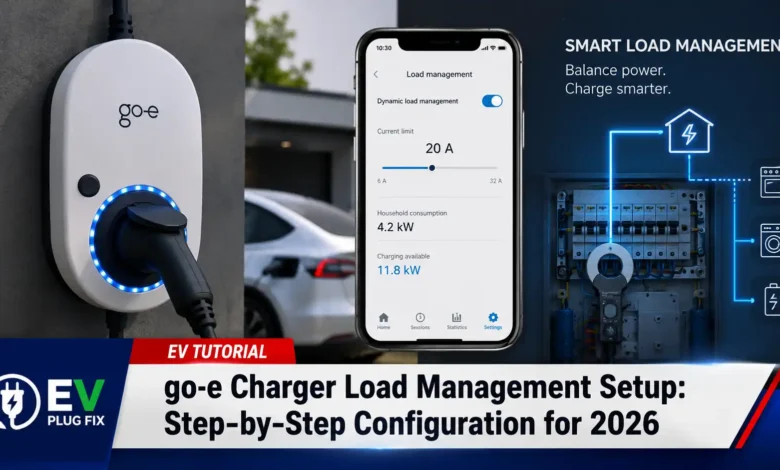
Go-e Charger load management is the essential configuration that prevents your home’s electrical system from becoming overwhelmed when you plug in multiple electric vehicles. Without proper load balancing, two or more go-e wallboxes charging simultaneously could easily trip your main breaker, leaving you with dead cars and a call to your electrician.
Whether you’re managing a household with two EVs or a small business fleet, getting your go-e charger group setup right from the start saves headaches, protects your equipment, and ensures every vehicle gets the juice it needs. The go-e ecosystem offers both static and dynamic load management options, and configuring them correctly requires understanding a few critical settings .
What Is go-e Charger Load Management and Why Does It Matter in 2026?
Load management is the intelligent system that distributes available electrical power among multiple go-e Chargers connected to the same supply line. Think of it as air traffic control for your electricity—it coordinates when and how much power each charger draws to prevent overloading your connection .
For example, if you have two go-e wallboxes sharing a 20 kW supply, load balancing ensures they don’t collectively exceed that limit. One charger might draw 11 kW while the other takes 9 kW, or they might split evenly at 10 kW each. The system constantly adjusts based on real-time demand and your configured priorities .
With EV adoption accelerating through 2026, more households than ever are installing second and even third chargers. The go-e load balancing feature has become increasingly critical as homeowners transition to multi-EV families and face the reality of limited electrical service capacity. For a deeper understanding of how different EV models perform in various conditions, check out our Kia EV6 winter range analysis.
Step-by-Step go-e Charger Group Configuration
Setting up your go-e charger group requires configuring several interconnected settings. Each step builds on the previous one, so follow this sequence carefully.
Generate Your Load Balancing Group ID
Before your go-e Chargers can communicate, they need to belong to the same group. This is accomplished through a unique Group ID that identifies all chargers sharing the same power supply .
To set this up:
- Open the go-e app and navigate to the load management settings
- For your first charger, either define a custom Group ID or tap “Generate group ID” to create one automatically
- Save the settings and carefully copy or write down the generated ID—you’ll need it for every other charger in your group
- For each additional go-e Charger, enter this same Group ID in its load management settings
Set the Maximum Total Current for Your Charger Group
The maximum total current setting defines the absolute ceiling for what your go-e Chargers can collectively draw. This value depends entirely on your electrical service capacity and what other appliances are running in your building .
This number must account for:
- Your main breaker rating (typically 32A, 40A, 50A, or higher)
- Other heavy loads like air conditioning, ovens, heat pumps, and pool equipment
- A safety margin to prevent nuisance tripping
Critical requirement: This setting must be identical across all go-e Chargers in your group. If one charger has a higher total current limit than the others, the load balancing algorithm won’t function correctly.
Configure the Maximum Grid Current for Dynamic Load Management
If you’re using a go-e Controller—which enables true dynamic load management—you’ll need to set the maximum grid current . This is the total current your entire household can draw from the utility grid, not just what’s available for charging.
With the go-e Controller installed, dynamic load balancing continuously monitors your home’s total consumption and adjusts charging power in real-time. If you turn on your oven or air conditioner while a car is charging, the system automatically reduces charging current to stay within the grid limit. When those appliances cycle off, charging power ramps back up .
This smart approach prevents overloads without requiring you to manually lower charging rates, making it the superior choice for homes with multiple large appliances. For detailed instructions on integrating the controller with renewable energy sources, see our go-e Controller Setup guide.
Setting Charging Priorities for Multiple go-e Chargers
Not all EVs have the same charging urgency. That’s where the charging priority setting becomes valuable. This feature lets you assign importance levels to each charger, determining which vehicle gets power first when demand exceeds supply .
Priority works on a numerical scale:
- Priority 1: Highest priority—these chargers receive maximum available power before others get anything
- Priority 2-98: Intermediate priority levels—higher numbers wait longer for available capacity
- Priority 99: Lowest priority—these chargers only receive power when there’s surplus available
Chargers with identical priority numbers share available power equally. This ensures fairness when multiple vehicles have similar urgency levels .
For example, if you have a plug-in hybrid that needs charging quickly for a morning commute (Priority 1) and a long-range EV that won’t be used until afternoon (Priority 5), the system ensures the hybrid gets charged first.
Fallback Mode: Maintaining Charge During Network Outages
What happens when your internet connection drops or the go-e Controller loses communication? The fallback mode ensures your EV can still charge even when network connectivity is disrupted .
When activated, fallback mode allows the go-e Charger to continue charging at a predefined current between 6 and 32 amps if the network connection is interrupted for more than 2 minutes.
This feature is particularly important in areas with unreliable internet connections or for installations where consistent cloud connectivity can’t be guaranteed.
Phase Assignment: Preventing Single-Phase Overloads
When charging with multiple three-phase wallboxes, phase imbalance becomes a real concern. Without proper phase assignment, all chargers might draw heavily from the same phase, causing localized overloads even when total current seems safe .
To prevent this, you must configure the phase assignment for each go-e Charger relative to your house connection. This ensures that chargers distribute their load evenly across all three phases, preventing any single phase from becoming overburdened.
If you have a go-e Controller, phase monitoring and balancing happen automatically. The system measures real-time current on each phase (L1, L2, L3) and adjusts charging parameters to maintain balance .
Dynamic vs. Static Load Management: Which Is Right for You?
go-e offers both static and dynamic load balancing options, and understanding the difference helps you choose the right setup.
Static Load Management
- Fixed maximum total current set once
- Does not account for other household loads
- Simpler setup, lower cost
- Requires manual adjustment if you add more appliances
- Suitable for dedicated EV circuits with no other significant loads
Dynamic Load Management (with go-e Controller)
- Continuously monitors whole-house consumption
- Adjusts charging power in real-time
- Maximizes available capacity safely
- More complex installation, higher upfront cost
- Ideal for homes with multiple large loads or solar installations
For most homes with multiple EVs and significant other electrical loads, dynamic load management is the superior choice. The go-e Controller enables features like solar surplus charging and automatic phase switching, making it a worthwhile investment for serious EV households . To explore different charger models and their capabilities, read our go-e Gemini flex Comparison.
Common go-e Load Management Mistakes to Avoid
Even experienced installers sometimes make errors during go-e charger load management configuration. Here are the most frequent pitfalls:
- Mismatched group IDs—Each charger must have the identical Group ID; otherwise, they won’t coordinate
- Different maximum total current settings—All chargers in the group must share the same value
- Ignoring minimum charging current (6A)—EVs require at least 6A to initiate charging; setting group limits too low prevents charging from starting
- Setting priority numbers incorrectly—Remember that lower numbers = higher priority
- Overlooking phase assignment—Critical for multi-phase installations
- Setting fallback current too high—Risk of severe overload if chargers resume at full power during an outage
For additional guidance on troubleshooting and maintaining your setup, refer to our EV Charging Maintenance Guide and EV Charger Error Codes resource.
Final Thoughts on go-e Charger Load Management Setup
A properly configured go-e load management system doesn’t just protect your electrical infrastructure—it ensures every EV in your household charges efficiently and reliably, every time.
Taking the time to correctly set up your go-e charger group prevents costly electrical failures, extends equipment lifespan, and gives you peace of mind knowing your multi-EV household can charge safely. Start with understanding your electrical service capacity, then methodically work through each configuration step.
As EV adoption continues to grow through 2026 and beyond, load management will only become more critical. The go-e ecosystem offers robust solutions for homes and businesses alike, and mastering these settings ensures you’re ready for whatever the electric future brings. For more information on optimizing your EV charging setup, explore our EV Load Shifting Strategies article.
Have questions about your specific go-e charger load management configuration? Leave a comment below or consult a qualified electrician for professional assistance.