How to Use a Public EV Charging Station: 2026 Step-by-Step Guide & Authentication Methods
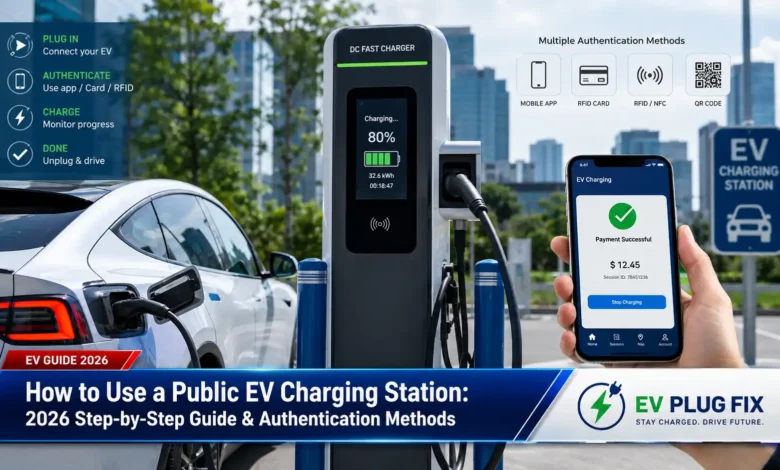
Public EV charging stations can feel intimidating for new electric vehicle owners, but understanding how to use a public EV charging station is simpler than you might think. Whether you are driving a Tesla, Chevrolet Bolt, Hyundai Ioniq, or Ford Mustang Mach-E, the process follows a consistent pattern across most networks. You need to locate a compatible station, park correctly, authenticate your identity, and start the charging session. This step-by-step breakdown covers every authentication method available in 2026—from RFID cards and smartphone apps to the increasingly common Plug & Charge and AutoCharge systems.
Before diving into authentication methods, a fundamental decision awaits every driver: AC or DC charging? AC charging uses your vehicle’s onboard charger to convert grid power to battery-ready current, typically delivering 7 to 22 kW depending on your car and the station. This makes AC ideal for longer stops like shopping trips, dining out, or overnight parking. DC fast charging bypasses the onboard charger entirely, sending high-voltage direct current straight to the battery at speeds from 50 kW to over 350 kW. Modern EVs can add 200 miles of range in 15 to 20 minutes on a powerful DC charger—perfect for highway journeys and quick turnaround scenarios.
Public stations in urban areas tend to offer AC charging more frequently, simply because installation costs are lower and dwell times are longer. DC fast chargers appear most often along major travel corridors and at dedicated charging hubs, where drivers need rapid top-ups. Understanding this distinction helps you plan your route effectively and set realistic expectations for charging duration.

Once you have identified the right station type and parked close enough for the cable to reach your vehicle’s port, you must authenticate. The charging station needs to know who you are, how to bill you, and when to start delivering power. This authentication process has evolved dramatically over the past few years, and 2026 offers more options than ever before. Some require physical cards, others rely on smartphone apps, and the most advanced systems handle everything automatically the moment you plug in.
Mobile App Authentication: The Most Common Method
Smartphone apps dominate the public charging landscape, with virtually every major network offering its own application for locating stations, checking availability, and starting sessions. Downloading the app from networks like ChargePoint, EVgo, or Electrify America lets you view real-time charger status, pricing, and compatibility before you even arrive. Once at the station, you can initiate the session directly from the app by selecting the specific charger or scanning a QR code displayed on the unit.
- Most charging apps show live availability so you never arrive to find all stalls occupied
- Apps typically store payment methods securely for seamless billing
- You can monitor charging progress remotely and receive notifications when charging completes
- Some networks offer discounted rates for app-based charging compared to ad-hoc payment methods
For drivers who travel frequently or use multiple networks, aggregator apps like Next Plug, PlugShare, or Google Maps can display charging points across various operators. These platforms help you find stations near restaurants, museums, or supermarkets by filtering the categories you need. Some European networks, such as EnBW mobility+, allow you to use various charging tariffs with a basic monthly fee, potentially saving money compared to paying per session with individual providers. For a deeper look at flexible pricing models, see our go-e Flexible Tariffs guide.
QR Code Scanning: Fast and Contactless
QR codes have become a standard feature on modern public charging stations, offering a rapid way to start a session without creating an account or downloading a network-specific app. Scanning the QR code with your phone’s camera typically redirects you to a mobile-optimized web page or, if you have the relevant app installed, launches it automatically. The page displays station-specific information including location, cost per kilowatt-hour, and preauthorization details.
From there, you enter payment information—credit card details, Apple Pay, or Google Pay—provide your phone number for SMS updates and receipts, and confirm the session start. The web app then guides you through plugging in and monitoring the charging progress. This method works particularly well for ad-hoc charging or travel situations where you prefer not to commit to a specific network’s app ecosystem.
RFID and NFC Cards: Reliable Offline Access
Radio Frequency Identification (RFID) cards and key fobs remain a popular authentication method, particularly for fleet drivers, workplace charging, and networks where mobile connectivity might be unreliable. You simply tap or swipe the card against the charging station’s reader, and the system identifies your account for billing purposes. RFID authentication works even when mobile networks are congested or unavailable, making it a dependable backup option.
Obtaining an RFID card typically requires signing up with a charging operator that offers tariffs suited to your driving patterns. Many networks provide cards as part of their subscription packages, and some allow you to order them directly through their mobile app. The card links to your account, letting you track charging history, view receipts, and manage payment methods through the associated platform.
Plug & Charge: The Frictionless Future
Plug & Charge represents the most advanced authentication method available in 2026, based on the ISO 15118 standard. This system handles user authentication and payment automatically when you connect the charging cable to your vehicle. No app, no card, no QR code—just plug in and walk away. The vehicle and charger exchange cryptographic certificates to authorize the session, ensuring secure billing without any manual steps.
Support for Plug & Charge has grown significantly, with major players like ChargePoint confirming that their entire current hardware portfolio supports the system. A growing number of automakers have enabled Plug & Charge on their vehicles, and starting in 2027, support for ISO 15118 will become mandatory across the European Union. This regulatory push accelerates adoption and ensures that new vehicles and charging stations will communicate seamlessly.
AutoCharge: The Interim Zero-Touch Solution
Before Plug & Charge gained widespread traction, some networks developed AutoCharge as an alternative seamless authentication method. AutoCharge relies on the vehicle’s MAC address to identify the driver, linking that identifier to a pre-registered account. Once you complete a one-time registration, subsequent sessions start automatically when you plug in—similar to Plug & Charge, but with a different underlying technology.
Providers including EnBW, Fastned, and NewMotion offer AutoCharge features. EVgo reports that approximately 30% of its charging sessions now use its version of the system, demonstrating significant consumer demand for frictionless experiences. However, industry experts consider AutoCharge an interim solution with important security considerations. The system’s reliance on MAC address matching creates potential vulnerabilities, as MAC addresses can be spoofed. Additionally, only vehicles with CCS ports support AutoCharge, limiting its compatibility.
- AutoCharge requires one-time pre-registration of your vehicle with the network’s backend
- It relies on the Open Charge Point Protocol (OCPP) for communication between chargers and management systems
- Security experts describe AutoCharge as “very rudimentary” compared to certificate-based authentication
- The system will likely be replaced by Plug & Charge as newer vehicles and chargers adopt ISO 15118
Bank Card Payments: Direct and No Contract Required
While still less common than app-based or RFID methods, an increasing number of charging stations accept direct credit and debit card payments. This option offers maximum convenience for drivers who prefer not to sign up for network accounts, download apps, or carry additional cards. Simply tap your contactless card on the reader, follow the screen prompts, and start charging.
The trade-off comes in pricing. Ad-hoc card payments typically carry higher tariffs than app-based or subscription rates, as operators price convenience accordingly. For occasional drivers or travelers in unfamiliar areas, the premium may be worth avoiding the hassle of account setup. However, regular EV drivers will find better value through network memberships and dedicated charging cards.
PIN Codes and Access Systems: Private and Semi-Public Charging
For workplace charging, residential complexes, and fleet depots, PIN codes or access-based authentication provide controlled access to charging facilities. Property managers or fleet administrators can issue temporary or permanent codes to authorized users, tracking usage and allocating costs accurately. These systems work well alongside RFID authentication, offering flexibility for guest access or situations where issuing physical cards is impractical.
Connector Compatibility Matters
Before you can authenticate and start charging, you must ensure your vehicle’s connector matches the station’s plug type. The connector landscape in 2026 includes several standards depending on your region and vehicle. In North America, the North American Charging Standard (NACS) has gained widespread adoption, with Ford, General Motors, Hyundai, Kia, Rivian, Volvo, and other major automakers committing to native NACS ports on their 2025 and later models. To understand the differences between the major connector types, check out our detailed J1772 vs CCS Charging comparison.
| Connector Standard | Primary Region | Max Power | Common Use Cases |
|---|---|---|---|
| NACS (SAE J3400) | North America | 250 kW+ | Growing standard for new EVs |
| CCS1 | North America | 350 kW | Legacy DC fast charging, transitioning to NACS |
| CCS2 | Europe, Australia, India | 350 kW+ | Dominant standard, EU-mandated for public DC chargers |
| CHAdeMO | Japan / Legacy sites | 50–100 kW typical | Declining, used by older Nissan Leaf models |
In Europe, CCS2 dominates the DC fast-charging landscape and is mandated for all new public DC chargers. Type 2 (Mennekes) serves as the standard AC connector across Europe, supporting three-phase charging up to 22 kW. Many European public AC chargers use a socket design, meaning you must bring your own Type 2 cable—an important consideration when traveling or preparing your vehicle’s emergency kit.
China operates with its own GB/T standard for both AC and DC charging. While globally less relevant for international travelers, it represents the world’s largest EV market by volume, with hundreds of thousands of stations across the country.
Step-by-Step Charging Session Walkthrough
Once you have identified the station type, confirmed connector compatibility, and chosen your authentication method, the charging process flows through predictable stages. Park as close to the station as possible—this matters especially at DC fast charging stations where cables attach permanently, and at AC stations where you might be using your own cable. A short, direct cable path reduces strain on connectors and minimizes tripping hazards.
Connect the charging cable to your vehicle’s port, ensuring a firm connection. If using an app or RFID card, authenticate before or after plugging in, depending on the network’s process. The charger and vehicle then communicate to establish safe charging parameters—determining the maximum power your car can accept based on its battery state, temperature, and current charge level.
Charging speed appears on both the station display and your app (or vehicle dashboard), showing kilowatts delivered and estimated time remaining. DC fast chargers can deliver between 50 and 350 kW, while Level 2 AC chargers typically range from 6 to 19 kW. Charging slows significantly after 80 percent to protect battery health, a point worth noting when planning road trips.
Monitoring and Ending Your Session
Throughout the session, you can track progress through multiple channels. The station’s screen shows real-time data including energy delivered, session duration, and cost accrued. Your network app updates with similar information and typically sends notifications when charging approaches completion. Some vehicle systems also display charging status on dashboard screens or through mobile companion apps.
Ending the session follows a simple sequence: stop the charge through the app, station interface, or vehicle controls, wait for the connector to unlock, unplug, and return the cable to its holster. Good etiquette dictates moving your vehicle promptly after charging to free the station for other drivers. Many networks impose idle fees to discourage overstaying, so monitoring your session and returning promptly saves both money and frustration. For a comprehensive overview of charging speeds and what to expect from different power levels, explore our EV Charger Comparison Guide.
- Always verify your vehicle’s charging port location before arriving—knowing whether it is on the front, rear, or side helps you position properly
- Keep a compatible charging cable in your trunk for stations that do not provide tethered cables, especially in Europe
- Set maximum charge limits in your vehicle to 80% for daily driving and reserve 100% for long trips
- Download network apps ahead of time and register payment methods before you need to charge

Essential Questions & Expert Answers
What is the difference between Plug & Charge and AutoCharge?
Do I need a separate app for every charging network?
How do I know which connector my EV uses?
Why does charging slow down after 80 percent?
What should I do if the charging station doesn't recognize my authentication method?
Public EV charging in 2026 offers more authentication choices than ever before, accommodating everyone from spontaneous first-timers to daily commuters with preferred network memberships. The industry continues its shift toward frictionless experiences—Plug & Charge adoption grows, QR codes simplify ad-hoc access, and RFID cards provide reliable backup when connectivity fails. Understanding these options before arriving at a station eliminates stress and ensures every charging session starts smoothly.