go-e Charger LED Status & Cable Lock Settings Explained for 2026
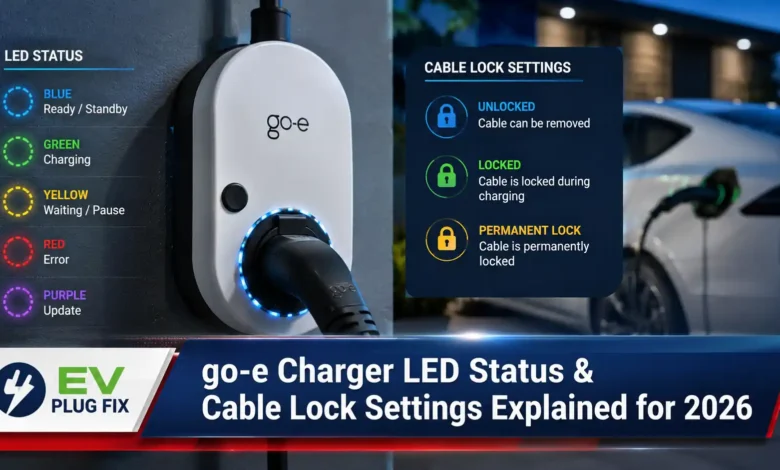
Go-e charger LED status indicators and cable lock settings are fundamental to mastering your EV charging experience, yet many owners overlook the rich diagnostic information these features provide. The go-e Gemini and Gemini 2.0 smart chargers communicate critical data through their LED rings, from phase detection to charging completion, while the configurable cable lock offers both security and convenience. Understanding these visual signals and settings transforms your charging sessions from guesswork to precision control, ensuring you always know exactly what your charger is doing and can customize its behavior to match your needs. Whether you’re a new EV owner or a seasoned go-e user, mastering these features enhances both safety and efficiency at every charge.
Modern EV charging stations like the go-e Gemini utilize sophisticated LED signaling systems that provide real-time feedback about every stage of the charging process, strictly adhering to the global IEC 61851 safety standard for conductive charging. The LED ring around the type 2 socket serves as your primary communication channel, instantly conveying phase status, current flow, and session progress through carefully designed visual patterns. This intelligent design eliminates the need to constantly check your smartphone app for basic status updates, allowing you to assess your charging session at a glance.
Beyond the LED indicators, the go-e charger’s cable lock settings represent a crucial intersection of security and user convenience. By default, the cable remains locked in the type 2 socket after charging finishes, providing theft protection for your valuable charging cable. However, this setting can be customized through the go-e app to automatically unlock after charging completion or following a power failure, giving you flexibility based on your specific usage scenarios and security concerns.
Quick go-e Charger LED Status Summary
If you need an immediate diagnostic check, use this reference table to quickly decode your go-e charger’s current LED light pattern and know what action to take:
| LED Color / Pattern | Meaning | Recommended Action |
|---|---|---|
| 1 Clockwise Rotating Tail | 1-Phase Charging active (230V) | Normal operation. Verify if vehicle supports 3-phase if faster speed expected. |
| 3 Clockwise Rotating Tails | 3-Phase Charging active (400V) | Normal operation delivering up to 22kW depending on grid/vehicle limit. |
| Solid Vibrant Green | Charging process complete | Safe to disconnect cable or leave locked based on app cable lock configuration. |
| 4 Red LEDs (3, 6, 9 & 12 o’clock) | Ground check error / Unidentified Earth connection | Check home electrical grounding. Deactivate ground check via app ONLY on IT power grids. |
| Blue with Moving White LEDs | Access Control Standby (RFID/App authorization needed) | Scan an authorized RFID chip or tap “Start” in the go-e app to release current. |
| Flashing Blue LEDs | Waiting for Eco Tariff / Solar Excess Charging | Charger is paused based on flexible electricity pricing or solar scheduler. Stand by. |
| Flashing Pink & Yellow | Firmware update in progress | Do not disconnect power. Wait for completion. |
| Permanent Rainbow Colors | Startup incomplete / WiFi interference | Check for WiFi mesh interference, move router sources away, and restart unit. |
Decoding go-e Charger LED Status Indicators
The go-e Gemini features include an LED ring that provides a comprehensive visual language communicating everything from phase detection to firmware update status. When your vehicle authorizes the charging process, the LEDs commence a clockwise rotation around the type 2 socket, with the number of “tails” formed by the LEDs corresponding to the number of connected phases or those set in the app.
Rotating Tails and Power Signalization
This intelligent design immediately informs you whether you’re charging with 1-phase at 230V or 3-phase at 400V, a crucial distinction for understanding your charging speed and electrical load. Pay close attention to both the speed and length of the rotating tails for deeper insights into the charging current.
Interpreting LED Rotation Speed and Session Control
Faster rotation typically indicates higher current flow, while slower patterns suggest reduced charging rates. The LED behavior during charging provides continuous feedback on session progress, with the charging process considered complete when the LEDs transition to a vibrant green color.
Should you need to halt the charging ahead of schedule, you can do so by using your vehicle’s “cable release” function or by hitting the prominent round button within the go-e Charger app under “Charging.” This dual-method approach ensures you always have control, whether you’re at the vehicle or managing your session remotely.
Understanding Phase Detection Through LED Tails
The go-e charger’s LED ring offers immediate visual confirmation of your charging phase configuration, a feature particularly valuable for EV owners who may charge at different locations with varying electrical infrastructure.
1-Phase vs. 3-Phase LED Visual Guidance
When you see 1 rotating tail, you’re charging with single-phase at 230V, typically delivering up to 7.4kW depending on your vehicle’s onboard charger and circuit capacity. The 3 rotating tails indicate 3-phase charging at 400V, capable of delivering up to 22kW with compatible vehicles and installations.
Troubleshooting Phase Mismatches
This visual feedback serves multiple purposes beyond simple curiosity. It helps you verify that your charger is configured correctly for your electrical system, confirms that your vehicle is accepting the expected phase configuration, and provides immediate troubleshooting insight if the LED display doesn’t match your expectations. For instance, if you expect 3-phase charging but only see 1 rotating tail, you may need to check your vehicle settings or the charger’s configuration in the app.
Niche Diagnostic LED Signals Top Guides Ignore
Most online guides overlook specialized LED diagnostic codes that are vital for advanced troubleshooting. Understanding these lesser-known indicators saves time when diagnosing complex grid or smart charging configurations.
Ground Check Failure & IT Grid Warnings (4 Red LEDs)
If your go-e charger displays four solid red LEDs positioned precisely at 3, 6, 9, and 12 o’clock, the unit’s built-in “Ground Check” safety mechanism has failed to detect an adequate earth grounding. Standard European TT and TN power networks require this earthing for shock protection. However, if you are operating on an isolated IT power grid (frequently encountered in specific regions of Norway or Belgium), ground check failure will prevent charging by default. You can temporarily bypass ground check via the go-e app under safety settings, but this should only be toggled if you are absolutely certain your local grid configuration demands it.
RFID Access Control and Authorization States
When access control is activated to prevent unauthorized public use, the charger enters a standby state signaled by blue LEDs with two white LEDs moving from the top and bottom toward the center. This indicates that the station is powered but locked. Swiping an authorized RFID chip or releasing the session via the app will immediately trigger 5 solid green LEDs, confirming user authentication before initiating the rotating charging sequence.
Solar Excess & Dynamic Tariff Pause (Flashing Blue)
When paired with smart energy management systems like the go-e Controller or configured for flexible electricity pricing, the charger may enter an automated waiting state. During this time, the LEDs pulse slowly in blue, indicating that the unit is waiting for off-peak electricity pricing or sufficient solar PV excess production before initiating current flow.
LED Status Comparisons Across EV Chargers
While go-e chargers feature distinctive rotating tail patterns for phase detection, different EV charger manufacturers employ varying LED signaling systems. Understanding these differences helps EV owners navigate different charging infrastructure types confidently. For those interested in broader EV charging diagnostics, comparing these visual cues across brands provides valuable context for troubleshooting at public stations.
Other manufacturers like Powerverse utilize simpler LED systems where white blinking indicates charger ready, blue blinking signifies cable plugged into EV, green rolling indicates active charging, and solid green confirms charging completion. SMA EV Chargers feature green pulsing for active charging at over 90% nominal power, with red LEDs signaling events or vehicle-interrupted charging modes.
Cable Lock Settings: Security Meets Convenience
By default, the go-e charger keeps the cable locked in the type 2 socket after charging finishes, providing essential theft protection for your charging cable. This default setting ensures that your cable cannot be easily removed by unauthorized individuals, a significant consideration given the value of quality EV charging cables and the potential inconvenience of theft.
Customizing Locking Behavior in the App
However, you can change this setting via the go-e app, which offers comprehensive cable lock management through simple toggle controls. According to official technical specifications on the go-e official platform, the software allows three specific lock modes: “Unlock automatically” upon completion, “Always locked” for permanent cable attachment, or “Lock during charging”. This flexibility allows you to adapt your charger’s behavior based on private home garage or public outdoor installation needs.
Power Failure Auto-Unlock Scenarios
The ability to configure the app to automatically unlock the cable after a power failure represents a particularly thoughtful feature for emergency situations. In case of a power failure due to severe weather or grid issues, the cable will remain locked by default. To unlock it, you must power up the charging station again, which could be problematic if power doesn’t return when you need to drive off. The automatic unlock setting addresses this concern, though you should be aware that the cable won’t be theft-protected in this scenario.
go-e Charger App Control and Monitoring
The go-e Charger app serves as your central command center, providing access to all details about your charging status and enabling comprehensive control over your charging sessions. Available on both iOS and Android platforms, the app delivers real-time monitoring and management capabilities that significantly enhance your EV charging experience.
Through the app, you can enable or disable charging, change current settings, automatically end charging after reaching certain kWh thresholds, view detailed charging information, and manage RFID cards. The app also provides access to advanced features like LED brightness and color customization, ground check enablement, and comprehensive access control management. With go-e Cloud integration, you can access your charger from anywhere in the world, providing unprecedented control and monitoring capabilities.
Video Guide: go-e App Features & Setup Explained
For a complete visual walkthrough of the go-e Charger app settings, cable lock modes, and smart feature controls, watch the official video guide below:
Firmware Updates and Advanced LED Signals
The go-e charger’s LED system provides valuable feedback during firmware updates, a critical maintenance function for keeping your charger current with the latest features and security patches.
Pink and Yellow: Update in Progress
When a firmware update is initiated via the app, the LEDs flash pink and gradually turn yellow with increasing progress of the update. This visual feedback allows you to monitor the update’s progress without accessing your smartphone, reassuring you that the process is proceeding normally. A successful firmware update results in LEDs lighting up alternately green and pink, confirming the new firmware has been properly installed. If the update fails, the LEDs will alternate between red and pink.
Rainbow LEDs: WiFi Mesh Interference Troubleshooting
If the charger doesn’t complete its startup sequence and the LEDs remain permanently lit in rainbow colors, this may indicate WiFi signal disturbance, such as interference from devices with WiFi mesh networks. Troubleshooting this issue involves removing potential sources of interference or adjusting router proximity to allow the charger to complete its initialization process.
Red Flashes: Factory Reset Procedure
Resetting the go-e charger to factory settings is also possible using the reset card provided with your unit. Holding the reset card before the RFID reader causes all LEDs to briefly flash red, confirming the reset action has been initiated. This process doesn’t delete stored RFID chips or associated consumption data, providing a convenient way to resolve configuration issues without losing all your settings.
Essential Questions & Expert Answers
What does a single rotating tail on my go-e charger mean?
How can I change the cable lock settings on my go-e charger?
Why does my go-e charger show 4 solid red LEDs?
Why does my go-e charger show rainbow-colored LEDs?
Can I access my go-e charger remotely?
Conclusion: Mastering Your go-e Charger Experience
Understanding your go-e charger’s LED status indicators and cable lock settings transforms your EV charging experience from a simple plug-and-play operation to a sophisticated, controlled process. The rotating tail patterns provide instant visual confirmation of your charging configuration, while the customizable cable lock settings offer the perfect balance between security and convenience.
Whether you’re monitoring phase detection through LED tails, configuring cable lock behavior in the go-e app, or troubleshooting firmware update issues, these features work together to deliver a seamless charging experience. The go-e charger’s intelligent design, combined with comprehensive app controls, ensures you always know exactly what your charger is doing and maintain complete control over your charging sessions.