go-e Charger Load Management Setup Guide for 2026: Master Multiple EV Chargers
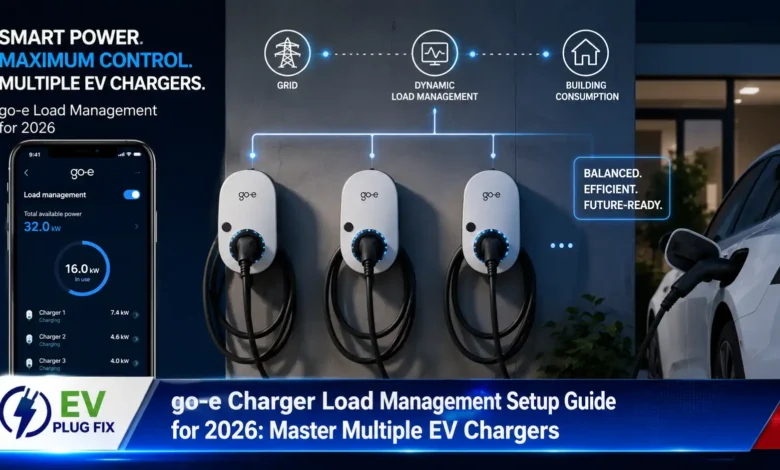
go-e charger load management is the essential feature that prevents your home’s electrical system from being overwhelmed when you have multiple EV chargers operating simultaneously. Without proper load management, two or more go-e chargers drawing power at the same time could trip your main EV Charger Circuit Breaker or create dangerous electrical conditions.
Modern electric vehicle owners with multiple EVs face a unique challenge: how to charge all vehicles efficiently without upgrading their entire electrical service. go-e has developed a sophisticated cloud-based load management solution that intelligently distributes available power among connected chargers, ensuring safe and efficient charging for your entire EV fleet. Understanding the difference between AC vs DC Charging is fundamental to appreciating why load management matters for home charging setups.
Understanding go-e Charger Load Management Fundamentals
Before diving into the configuration steps, it’s crucial to understand how go-e’s load management system works. The system operates through the go-e cloud, allowing all your chargers to communicate and coordinate power distribution in real-time. This cloud-based approach means your chargers continuously monitor each other’s power usage and adjust accordingly.
The load management feature automatically controls each charger’s power output based on your defined parameters, preventing any single charger from exceeding safe limits while ensuring all connected EVs receive adequate charging. This intelligent power distribution is particularly valuable during peak electricity demand periods or when your home’s electrical service has limited capacity. For a broader perspective on charging options, refer to our comprehensive EV Charging Levels Guide.
The Four Pillars of go-e Load Management Setup
Successfully configuring your go-e charger load management requires understanding four critical components. Each element plays a specific role in creating a balanced, efficient charging network for your electric vehicles.
Group ID Generation
Creates a unique identifier that links multiple go-e chargers into a single coordinated network for power sharing.
Maximum Total Current
Defines the overall power limit available to all connected go-e chargers based on your home’s electrical capacity.
Charging Priorities
Allows you to designate which vehicles receive priority charging when power is limited.
Fallback Mode
Ensures continuous charging operation when internet connectivity is lost.
Step 1: Generate Group ID for go-e Charger Network
Creating a group ID is your first and most critical step in establishing communication between your go-e chargers. The group ID functions as a digital handshake that tells each charger which other devices it should coordinate with during charging sessions.
To generate your group ID:
- Open the go-e charger app and navigate to the settings menu
- Select your primary go-e charger from the device list
- Tap on “Generate group ID” – this automatically creates a unique identifier for your first charger
- Important: Copy or screenshot the generated group ID immediately – you’ll need this same code for all other go-e chargers
When adding additional go-e chargers to your network, simply enter this same group ID in each new charger’s settings. This ensures all your chargers recognize each other and can coordinate power distribution effectively.
“The group ID is the digital glue that holds your go-e charging network together. Without identical group IDs across all chargers, load management simply won’t function.”
Step 2: Setting Maximum Total Current for Your EV Chargers
The maximum total current setting determines the absolute power limit available to your go-e charging network. This value must reflect your home’s electrical service capacity while accounting for other household power consumers.
To determine the appropriate maximum total current for your setup:
- Check your main circuit breaker’s rating – this is your absolute maximum capacity
- Subtract the power requirements of essential appliances and systems
- Consider future electrical needs for your home
- Leave a safety margin of at least 20% for unexpected load spikes
Critical note: This value must be identical across all go-e chargers connected to the same electrical service. When your chargers communicate and divide available charging current, they use this total current value as their reference point for power distribution decisions.
Step 3: Configuring Charging Priorities for Multiple go-e Chargers
Charging priorities give you granular control over which vehicles receive power first when your total current limit is approached. This feature is invaluable when you have multiple EVs with different usage patterns or battery states.
Priority levels range from 1 (highest) to 10 (lowest), with priority 1 receiving maximum available charging current before other chargers. Vehicles with lower priority numbers will charge more slowly or even wait entirely if power is limited.
For fair power distribution among multiple EVs, assign identical priority numbers to all go-e chargers. This ensures each vehicle receives an equal share of available power, though the distribution won’t necessarily be exactly even – chargers with lower battery demands may accept less current, allowing more power to reach vehicles with greater charging needs. If you’re still deciding which equipment best suits your needs, our guide on how to Choose the Right EV Charger offers valuable insights.
| Priority Scenario | Configuration | Best For |
|---|---|---|
| Equal Distribution | All chargers set to same priority | Multiple daily-use EVs with similar charging needs |
| Primary Vehicle Priority | Main EV set to priority 1, others at 2+ | Household with one primary commuter vehicle |
| Time-Sensitive Charging | Vehicle needing quick charge at priority 1 | Emergency or unexpected high-priority charging needs |
| Night Charging | All chargers equal priority | Overnight charging when time constraints are minimal |
Mid-Article Configuration Insights: go-e Charger Fallback Mode
Step 4: Mastering go-e Charger Fallback Mode Settings
Fallback mode represents your go-e charger’s contingency plan when cloud connectivity fails. Since load management relies on the go-e cloud for charger communication, internet interruptions can disrupt power sharing operations.
When your go-e chargers lose internet connectivity:
- Default behavior (value = 0): All charging processes stop, and no new charging sessions can begin until cloud connectivity is restored
- Custom fallback setting: You can define a specific charging current (minimum 6A) that each go-e charger can deliver during internet outages
The fallback current setting is critical for maintaining charging capability during unstable internet conditions. However, it requires careful calculation to avoid overloading your electrical system during cloud-based load management outages.
Calculating Safe Fallback Current Values
When configuring individual fallback currents for multiple go-e chargers, mathematical precision is non-negotiable. The sum of all fallback current settings across your charging network must never exceed your maximum total current value.
For example, if your maximum total current is 32A and you have two go-e chargers:
- Each charger’s fallback current should not exceed 16A (32A ÷ 2)
- For three chargers, each would be limited to approximately 10.6A
- Remember: each charger requires at least 6A to initiate charging
“The golden rule of go-e charger fallback configuration: sum of all fallback currents ≤ maximum total current. Violating this equation means risking electrical system overload during cloud service disruptions.”
go-e Load Management: Frequently Asked Questions
Can I use go-e load management without cloud connectivity?
While the primary load management system requires cloud communication for intelligent power distribution, the fallback mode ensures basic charging functionality during internet outages. However, dynamic load balancing between chargers is unavailable without cloud connectivity.
How many go-e chargers can I connect in one group?
The go-e system supports unlimited chargers within a single group, though practical limits depend on your electrical service capacity and total current settings.
Will load management work with different go-e charger models?
Yes, go-e’s load management system is compatible across all current go-e charger models, ensuring seamless integration regardless of specific charger version.
Optimizing Your go-e Charger Network for Maximum Efficiency
Proper go-e charger load management configuration transforms your EV charging experience from a potential headache into a seamless, efficient process. By following the steps outlined above – generating group IDs, setting appropriate current limits, configuring priorities, and preparing fallback settings – you’ll create a robust charging network that serves your household’s needs reliably.
Remember that go-e’s cloud-based approach offers significant advantages over simpler charging solutions. Your chargers continuously adapt to changing conditions, ensuring optimal power distribution even as your household’s electrical usage fluctuates throughout the day. For installations in multi-tenant buildings, understanding specific regional requirements like Austria Wallbox Installation regulations can be equally important for a complete setup.
For the best results, regularly monitor your go-e charger performance through the app and adjust settings as your household’s EV needs evolve. With professional-grade configuration, your go-e charging network will provide years of efficient, safe, and reliable service for all your electric vehicles.