go-e Charger PV Surplus Charging Setup: Open API vs Controller (2026)
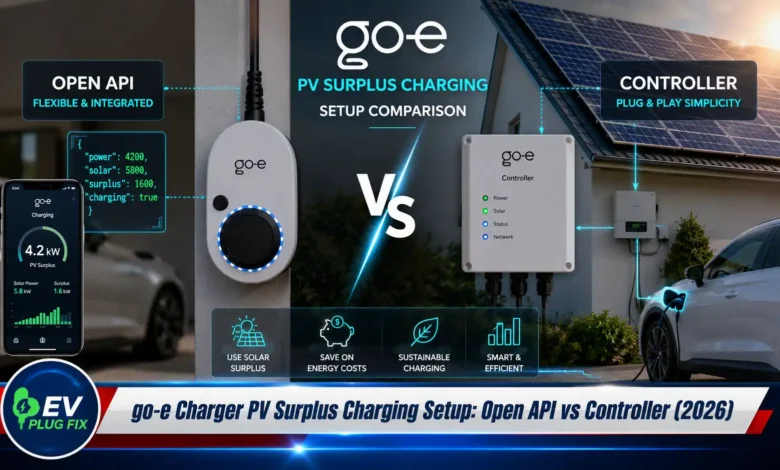
Setting up go-e Charger PV surplus charging allows electric vehicle owners to maximize their solar investment by using excess photovoltaic energy to power their cars instead of exporting it to the grid. go-e offers two primary paths for homeowners: a highly customizable open API method for tech-savvy users and an integrated solution using the go-e Controller. This article breaks down both approaches, giving you the insights needed to choose the right setup for your home.
Why Use Solar Surplus for EV Charging?
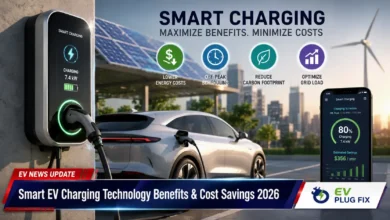
Charging your electric vehicle with solar power is one of the most effective ways to reduce your carbon footprint and energy bills. By channeling surplus solar energy—the power your panels produce but your home isn’t using—into your EV battery, you can significantly lower your reliance on the grid. In 2026, with rising electricity costs and a push for renewable energy self-consumption, this practice is more relevant than ever. The financial benefits are compelling, especially when you consider that the average retail electricity price in many European countries is several times higher than the feed-in tariff for exporting solar energy.
How go-e Charger PV Surplus Charging Works
At its core, PV surplus charging requires a smart energy management system (EMS) to monitor your home’s power flow and tell the charger when to start, stop, or adjust its current. The go-e Charger is uniquely suited for this because of its flexible open HTTP API. This API allows third-party software to read the charger’s status and send commands, such as setting the maximum charging current based on available solar power .
Both methods described below rely on this same principle but differ in how the energy data is collected and processed.
Method 1: Open API PV Surplus Charging (The Tech-Savvy Path)
This approach involves connecting your go-e Charger to a third-party energy management system with an open API. These systems act as the “brain,” reading data from your PV inverter, smart meter, or grid connection and then sending dynamic current limits to your go-e Charger via its local API.
Choosing an Energy Management System
The go-e Charger is compatible with a wide range of open-source and commercial EMS platforms. Here are some of the most popular options:
- Home Assistant: An open-source home automation platform with a powerful go-e integration that allows for complex automations .
- ioBroker and openHAB: Other highly customizable open-source systems that provide deep control .
- openWB, Loxone, Solar Manager, and GridX: These offer more user-friendly interfaces while still leveraging the go-e API for advanced control.
Setting Up the go-e Charger’s HTTP API
Before any EMS can communicate with your charger, you need to enable its local HTTP API. This is a simple process done directly in the go-e app:
- Connect to your go-e Charger via the go-e app (available for iOS and Android).
- Navigate to Settings > Connection > API Settings.
- Toggle on “Allow access to local HTTP API vX”. It is recommended to enable version 2 (v2) if supported by your charger hardware, as it offers more channels and features .
Once enabled, your EMS can send commands to the charger’s local IP address on port 80. No authentication is required for this local control; the toggle alone acts as the security measure .
How the Data Flow Works
For a seamless experience, your EMS needs to send real-time data to the go-e Charger. Many systems use the API to write two specific values to the charger to enable its Eco charging mode :
- Power to Grid (pGrid): The net power your home is exporting to or importing from the grid. A positive value indicates import, while a negative value indicates export (surplus).
- PV Power (pPv): The total power currently being generated by your solar panels.
With the charger in “Eco” mode, it uses this incoming data to automatically adjust its charging current. If surplus power is available, it ramps up; if the sun goes behind a cloud, it scales down. The charger itself doesn’t measure this data; it relies entirely on your external EMS to provide it .
This open API method offers incredible control, allowing you to create custom rules, prioritize loads, and even incorporate battery storage into your automations. However, it requires a significant investment in time and technical knowledge.
Method 2: The go-e Controller (The Simple Solution)
For users who want a more straightforward, plug-and-play experience, the go-e Controller is the recommended option. This device acts as a dedicated energy manager and connects directly to your home’s meter box, physically measuring the grid feed-in and consumption .
The controller communicates with your go-e Charger to adjust the charging current based on the measured surplus power. This setup is generally more reliable and requires minimal configuration compared to managing an open-source EMS. It’s an ideal choice for homeowners who want a “set it and forget it” solution.
In many markets, the go-e Charger Gemini flex and similar models are sold with the option to include a controller, and the manufacturer promotes this as the standard way to enable PV surplus charging .
Software-Only Alternative
It is worth noting that some third-party providers, such as emanger by new-energie, offer a software-only solution that bypasses the need for a physical go-e Controller . This service fetches current power values directly from your PV inverter via the internet and uses the go-e API or OCPP to control the wallbox. This offers a middle ground for users who want the simplicity of a managed service without the hardware installation.
Comparison: Open API vs. go-e Controller
Here is a quick comparison to help you decide which path is right for you:
| Feature | Open API Method (Home Assistant, etc.) | go-e Controller Method |
|---|---|---|
| Technical Expertise | High – requires coding/YAML knowledge | Low – Plug-and-play installation |
| Cost | Low (software is often free) + hardware costs | Moderate (purchase price of the controller) |
| Flexibility | Extremely high – fully customizable automations | Limited to manufacturer-defined functions |
| Setup Time | Long – may take days or weeks to perfect | Short – can be completed in hours |
| Reliability | High, but dependent on your system’s stability | Very high – dedicated hardware |
| Best For | Tech enthusiasts and system integrators | Homeowners seeking a simple, reliable solution |
Key Takeaways for Your Setup
The best method for PV surplus charging with a go-e Charger depends entirely on your technical comfort level. If you enjoy tinkering and want full control, the open API route is incredibly rewarding. If you prefer a reliable, user-friendly experience, the go-e Controller is the clear winner.
Regardless of which method you choose, enabling PV surplus charging is one of the smartest upgrades you can make to your home energy system. It not only reduces your electricity bills but also contributes to a more sustainable future by maximizing the use of renewable energy. With the go-e Charger’s open architecture, you have the flexibility to start simple with the controller and later migrate to a more advanced open API setup as your needs evolve.